
Retrieval: operations, search, graph and SQL
An agent needs different things from memory at different moments: who a name refers to, what is currently true about a project, what exactly a source said, how two people are connected. One search box that returns "similar text" answers none of these well. It returns a pile of passages and leaves the model to sort fact from rumour and old from new.
RememberStack gives you three layers to read from, from most guided to most open:
- Four assured operations: fixed, documented reads that cover most agent context.
- Retrieval primitives: search, lookup, graph traversal, hydration and neighbouring passages, for when you need a specific shape.
- SQL queries over the query space, for questions no fixed read anticipates.
None of them calls a language model. The operations and primitives return the same self-describing envelope; SQL queries return a table with its own account of limits and drops.
Ways to reach the memory
The same reads are available from four places. Pick by who is asking:
| Surface | Use it for | What it reaches |
|---|---|---|
Python client (import remember) | Your own code: sync jobs, pipelines, an agent you build. | Everything: ingest, readiness, the four operations, every primitive, SQL queries and saved queries, with typed results. |
CLI (remember) | A terminal or a shell script: one-off questions, checking what the memory holds, trying a SQL query. | Ingest, the four operations (remember query, remember operations run), SQL and saved queries, adjacent chunks. Prints JSON. |
MCP (remember mcp) | A coding agent such as Claude Code or Codex. | Ingest, readiness, the four operations and the seven SQL query tools. No primitives. |
| HTTP API | Any other language or runtime. | Every route; the other three are built on it. |
The four assured operations
An assured operation is a read whose behaviour, parameters and result
contract are fixed by RememberStack and registered in every deployment. They
are the default tools for an agent; the remember MCP server exposes them
as tools. GET /operations lists them with their full schemas.
| Operation | Answers | Returns |
|---|---|---|
resolve_entity | "Who or what is this name?" | Ranked entity candidates, never a silent pick. |
facts_context | "What does memory hold true about this?" | Adjudicated facts (relations and observations) under a time scope, with sampled evidence. |
claims_and_sources_context | "What exactly did the sources say?" | Current claims and matching source passages. |
combined_context | "Give me both." | Claims-and-sources and facts, side by side, in ContextBundle/v2. |
When to use each
Start with resolve_entity whenever the question names someone or
something. It turns "Ravi" into an entity_id, or tells you there are two
Ravis, or that there is none. Pass the chosen IDs to the next call as
entity_ids. See Entities.
Use facts_context for what is true. Current state, who owns what, what
changed, what was true on a date. Facts are de-duplicated, dated and counted
across sources, so ten notes saying the same thing come back as one fact
with evidence_count 10. Arguments:
| Argument | Default | Limits |
|---|---|---|
query | required | 1 to 8,192 characters |
entity_ids | none | 1 to 19 IDs |
k | 15 | 1 to 30 facts |
evidence_per_fact | 3 | 1 to 5 claims |
hops | 1 | 1 or 2 |
predicate | none | one predicate name |
time | {"mode": "current"} | current, at, overlap, history; see Time |
With entity_ids and a current or at time scope, facts_context first
expands the graph hops steps out from those entities, then searches fact
text inside that neighbourhood. That is how "what is Ravi working on?" finds
the facts about Ravi's projects, not only facts with Ravi in the text.
Use claims_and_sources_context for what was said. Exact wording,
quotes, tone, who said what and when, or anything the fact layer did not
capture. It returns current testimony only. Arguments: query, optional
entity_ids (up to 20), k (default 50, up to 100) and candidate_k
(default 200, up to 400) nominations per search channel.
Use combined_context when you want both and do not want to make two
calls. It runs the two operations independently and returns them side by
side, never blended. It takes query, entity_ids, hops, predicate and
time.
import remember

with remember.Client() as memory:
    who = memory.resolve_entity("Ravi")
    ravi = who.entities[0].entity_id if len(who.entities) == 1 else None

    facts = memory.facts_context(
        "what is Ravi working on", entity_ids=[ravi] if ravi else None
    )
    said = memory.claims_and_sources_context("Ravi cutover date")
    both = memory.combined_context("billing migration cutover")
Note
The Python client's claims_and_sources_context sends only query. To
pass entity_ids, k or candidate_k, call
memory.run_operation(name="claims_and_sources_context", arguments={...}).
A good default order for an agent: resolve the names, ask facts_context,
and fall back to claims_and_sources_context for exact wording or for
anything the facts do not cover. See
Give an agent context.
Retrieval primitives
Primitives are the building blocks the operations are made of, exposed for when you need one exact shape. They are available over HTTP and in the Python client. They are not assured operations and are not separate MCP tools.
| Primitive | Client method | What it returns |
|---|---|---|
| Search claims | search_claims(query=, k=10, channel="semantic") | Claims, from one search channel (semantic or bm25), k up to 400. |
| Search chunks | search_chunks(query=, k=10, channel="semantic") | Source passages, likewise. |
| Adjacent chunks | adjacent_chunks(chunk_id=, window=1) | The passages either side of a chunk in document order, window 1 or 2. Use it when an answer is cut off at a chunk boundary. |
| Resolve | resolve(name=, context_entity_ids=()) | Like resolve_entity, optionally reordered by up to 8 entities already in focus. |
| Lookup relations | lookup_relations(subject_entity_id=, predicate=, object_entity_id=, valid_at=, k=50) | Relations matching a pattern, current or at one instant, at most k. |
| Lookup observations | lookup_observations(entity_id=, property_query=, k=10) | One entity's observations, optionally by property text. |
| Graph neighbourhood | graph_neighborhood(entity_id=, hops=2, ...) | The entities and relations within hops (up to 4), capped at limit (up to 500) with a continuation. |
| Graph path | graph_path(from_entity_id=, to_entity_id=, max_hops=4) | Shortest connections between two entities (up to 6 hops). |
| Citation path | graph_citation_path(from_doc_id=, to_doc_id=, max_hops=6) | How one document leads to another through citations. |
| Hydrate relation | hydrate_relation(relation_id=) | A relation with all its claims and source documents. |
| Relation transcript | transcript_relation(relation_id=) | Why the memory believes a relation: its decision history. |
The graph reads take valid_at and believed_at together for a two-clock
read (see Time). A graph path is returned
whole or not at all: if any edge on it no longer holds, the path is dropped,
because a path with a gap is a false statement about a connection.
See Search, Graph and Resolve, lookup, hydrate, transcript.
SQL queries over the query space
For questions the operations and primitives do not cover ("which documents
mention both Dana and the billing migration, newest first?"), you can run
SQL queries over the query space, memory_v1: a set of prepared,
read-only views and functions over claims, facts, entities, documents,
chunks, evidence and history.
It is not open access to the database. Every statement is parsed and validated against the query space before it runs, and anything outside it is rejected. Results are bounded and read-only.
with remember.Client() as memory:
    result = memory.open_query(
        "SELECT claim_id, claim_text, asserted_at FROM claims_live"
        " ORDER BY asserted_at DESC NULLS LAST LIMIT 20"
    )
    for claim_id, claim_text, asserted_at in result.rows:
        print(asserted_at, claim_text)
Each row is a list of values in the order of result.columns.
You can explore the query space (describe_query_space,
search_query_space), check a statement without running it (explain_query),
and store reviewed statements as saved queries that agents run by name
with parameters.
See Explore memory with SQL,
Saved queries and
Query space.
How hybrid retrieval works
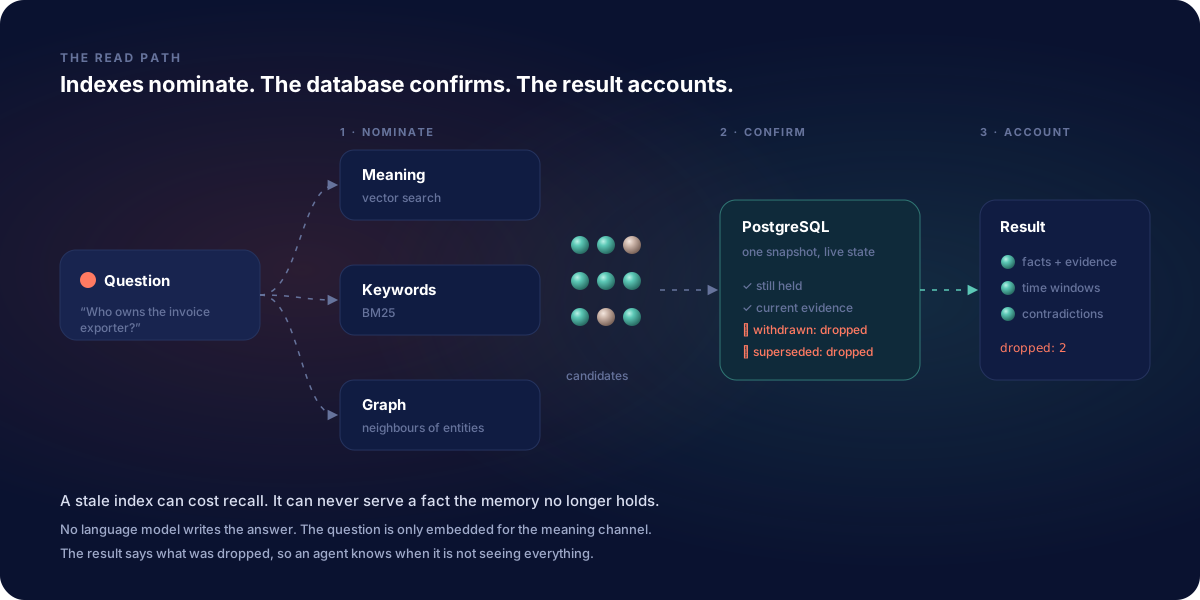
Underneath, every read that searches follows the same pattern: nominate, fuse, confirm.
Nominate. Independent channels each propose candidates:
- Semantic: vector similarity search with pgvector, over embeddings of chunks, claims, facts and entity profiles. The query text is embedded with the deployment's embedding model.
- BM25: keyword ranking over chunks and claims, with PostgreSQL's
pg_textsearch. It catches exact names, codes and numbers that vectors blur. - Graph: for
facts_contextwith entity anchors, the live PostgreSQL graph expands to the anchors' neighbours, and fact search runs inside that scope.
Fuse. Channel rankings are merged with reciprocal rank fusion (RRF): each
candidate scores the sum of 1 / (60 + rank) over the channels that found
it. Something that ranks well in both semantic and keyword search rises; the
per-channel scores stay visible in the result's ranking.
Confirm (hydrate). Search indexes are a way to find candidates; they
are never the authority. Every candidate is re-read from the live PostgreSQL
tables in one consistent snapshot before it is returned. A candidate that no
longer holds (a claim that is no longer current testimony, a fact that was
retracted or falls outside the time scope, an entity that was merged away)
is dropped, and the envelope counts it in dropped_by_hydration. Stale
index entries can cost recall; they cannot put a false answer in front of
your agent.
In claims_and_sources_context this runs twice, once for claims and once
for passages, each with its own semantic and BM25 nomination (up to
candidate_k each), fusion and confirmation. Claims that say the same thing
from several documents are grouped, with a
corroboration count. The two lists come
back in one envelope, kept apart: evidence for claims, chunks for
passages.
Where to go next
- Reading a result: the envelope field by field.
- Assured operations: full schemas.
- Give an agent context and Build a memory-backed agent.
- MCP tools: what the
rememberMCP server exposes.